A Starter Blueprint for Reincarnated — A Simple Layout New Players Can Aim For
A simple Reincarnated starter factory layout for new players: why it works, how to build it, and how to save it as your own blueprint code.
New players in Roblox Reincarnated [Sandbox Tycoon] tend to make the same first mistake: scattering machines around the base with no plan, then hitting a wall when income stalls and the layout can’t be expanded. The fix isn’t grinding — it’s borrowing a layout that already works, understanding why it works, and saving it as your own blueprint before your first Reincarnate wipes everything.
This page walks you through a simple starter factory layout and shows you how to save it as a reusable blueprint code of your own. It’s for Reincarnated [Sandbox Tycoon] by Dreamscape (Place ID 126642046443487) — if you’re playing a different “Reincarnated” game, this guide doesn’t apply.
Why New Players Should Think in Blueprints
Reincarnated’s core loop is: build an ore factory → earn cash → expand → Reincarnate to reset for permanent power → build again, faster. That loop has two consequences:
- Your first layouts are disposable by design. Every Reincarnate wipes your factory.
- Rebuild speed is a real progression skill. The faster you restore a working layout after a reset, the faster you’re earning again.
So the smart beginner approach is: copy a proven layout first, understand it second, modify it third. Inventing optimal machine arrangements from scratch — with 500+ placeable droppers, upgraders, conveyors, and furnaces available — is a slow way to learn when a working blueprint teaches you the pattern in five minutes.
Starter Layout Design Goals
A good starter layout for Reincarnated does four things, in this order of importance:
- Start with 1–2 droppers. One or two droppers keep the early line cheap and readable while you learn the flow; duplicate the line once income allows.
- A short, basic upgrader chain. A couple of upgraders along the ore’s path is enough to multiply early income. Long chains are a mid-game project.
- A furnace at the end. Every line needs a place where ore is processed and pays out — cap the conveyor with a furnace so nothing backs up.
- Deliberate empty space. Leave a clear strip beside the line — expansion room is what separates a starter layout from a dead end.
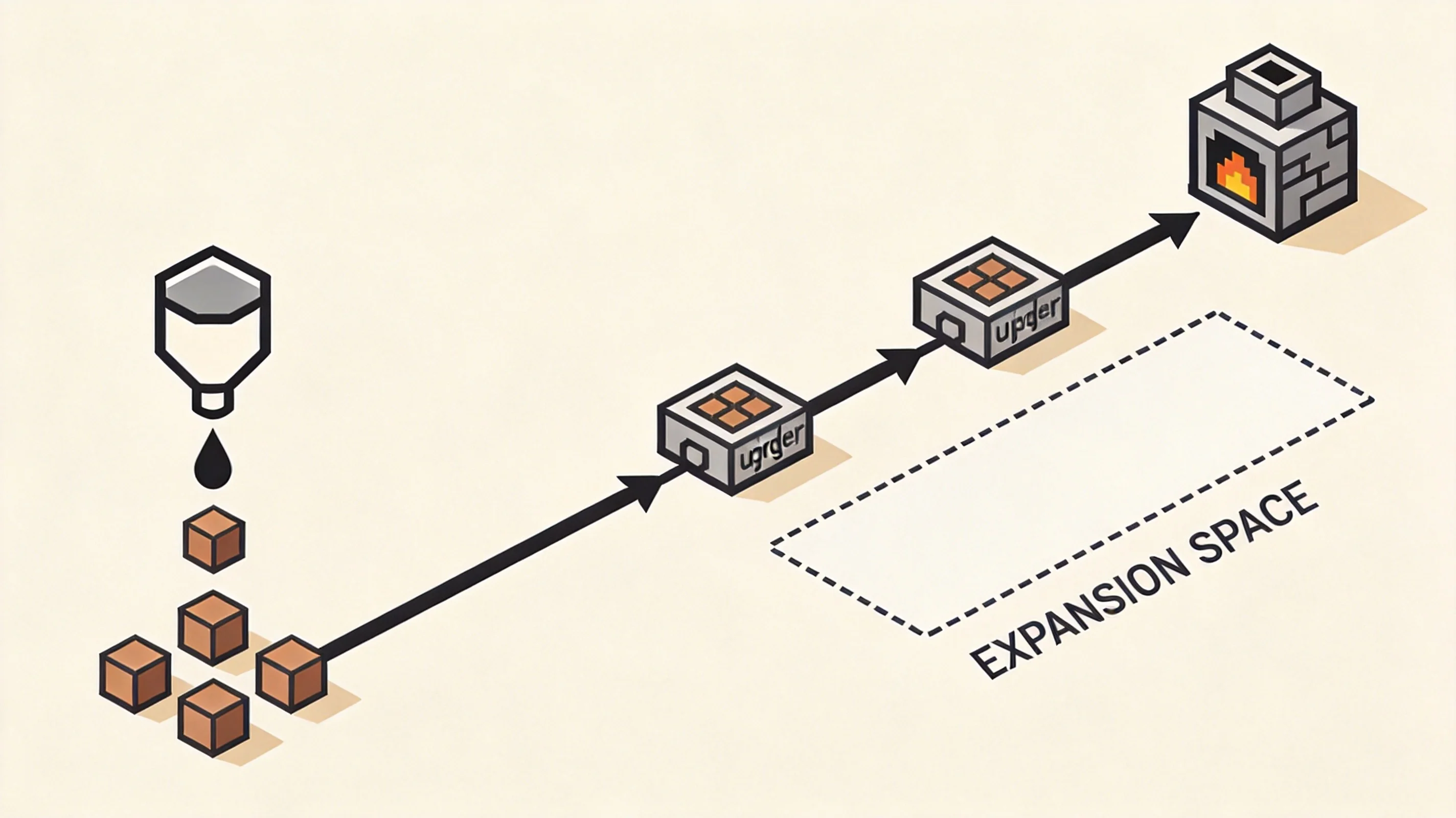
Top-down view of the starter layout: dropper → conveyor → upgraders → furnace, with the expansion strip beside the line (illustrative).
Step-by-Step: Building Your First Line
Here’s the build order, written so you can follow it in-game. Exact machine names, prices, and upgrade values vary by tier and update — treat the in-game shop descriptions as the source of truth, and don’t stress the numbers.
Step 1: Place your dropper(s). Put one dropper (or two, side by side) at the start of your open space. Droppers automatically produce ore — everything else in the layout exists to serve that income.
Step 2: Lay the conveyor path. Run a conveyor straight out from the dropper. Keep your first path short and straight — turns and junctions are where new players break ore flow.
Step 3: Add upgraders on the path. Place one or two basic upgraders so ore passes through them on the way down the conveyor. Principle: upgraded ore is worth more than raw ore at the furnace. Check each upgrader’s in-game description — effects and values differ per machine and change between updates.
Step 4: Finish with a furnace. Cap the line with a furnace — the payout point where ore converts to cash.
Step 5: Run it and watch. Let a few ore pieces travel the full path and confirm they spawn, move, get upgraded, and cash out without stopping.
Common mistakes to avoid:
- Blocking the ore’s path — a machine or wall placed across the conveyor stops the line silently.
- Buying too many machines too early — one working line earns more than five broken ones.
- Building into a corner — a line with no room beside it is a layout you’ll demolish later.
- Skipping the test run — always watch one full ore cycle before you call a line done.
Try Importing a Community Code First
Before building anything, you can try loading a layout someone else already made. The only blueprint code we’ve found shared publicly by the community is:
KC2H-8ZYD
It’s a starter layout shared by SpoildSoup in the official Reincarnated Discord’s #setup-support channel in March 2026 — before the October 17, 2026 Reignited visual update. Verify it still works in-game; if the import fails, the code is likely outdated, not mistyped. Current status lives on our Reincarnated blueprint codes page.
If it imports, study it — machine order, spacing, expansion room — then keep, adapt, or rebuild it line by line. If it doesn’t, build the layout from the steps above instead; same destination, better understanding.
Save Your Layout as a Blueprint Before You Reincarnate
Once your line runs clean, do the thing most beginners forget: open the Blueprint menu in-game and save the layout as a blueprint. You’ll get a short XXXX-XXXX code — write it down somewhere safe.
Here’s why this matters more than any single machine purchase:
- Reincarnating resets your factory. Every dropper, upgrader, conveyor, and furnace placement goes away in exchange for permanent bonuses that make your next run stronger. (Cosmite and boxes survive the reset — your physical layout does not.)
- A saved blueprint turns a full rebuild into one import. After a Reincarnate, load your code and you’re earning again in minutes, not re-placing machines from memory.
- Your code is shareable. Hand it to friends just starting out, or build a small library of layouts as you progress.
That’s the blueprint mindset in one sentence: build once, save the code, and never rebuild from zero again.
FAQ
How many droppers should a starter layout have? One or two. A single clean line teaches you the full dropper → upgrader → furnace flow cheaply. Add a second only after the first runs without problems.
Should I import a code or build my own first layout? Try the community code first — it takes seconds and shows you what working looks like. But build the starter line yourself too: placing each machine is how you learn what the layout actually does.
Do blueprints survive a Reincarnate? Your built factory does not — that’s the point of the reset. A saved blueprint is your rebuild kit: one code restores the layout after the wipe. Verify the exact blueprint-storage behavior in-game, since the developer hasn’t documented the details publicly.
What do I do if KC2H-8ZYD won’t import? It was shared in March 2026, before the Reignited update, so it may be outdated. Build the starter layout from the steps above instead — same result, better understanding.
Where do I enter a blueprint code? In the Blueprint menu (import option) — not the gift button. The gift button is for redeem codes like MORECHANGES, which give rewards, not layouts. Hyphen in the code = blueprint code.
Related Articles
blueprints
Reincarnated Blueprint Codes (November 2026) — Community Shared Layouts
Every verified Reincarnated blueprint code shared publicly by the community, with the blueprint-vs-redeem-code difference explained and how to submit yours.
blueprints
Reincarnated Blueprint Guide — How to Save, Import & Share Layout Codes
How Reincarnated blueprints work: save your factory layout, import shared codes, and share your own — plus the difference from redeem codes.
Was this helpful?
Thanks for the feedback!